

As a financial advisor, you understand the importance of generating high-quality leads and effectively managing those leads to convert them into clients. Lead tracking is a critical aspect of any successful lead generation strategy.
SmartAsset is a powerful tool for generating leads in the financial industry, but without an effective lead tracking program, these opportunities can easily slip through the cracks.
That’s where Redtail CRM comes in. By the integration between Redtail CRM and LeadCenter.ai, you can track SmarAsset leads as a contact. You can streamline your lead management process, prioritize your follow-up efforts, and improve your conversion rates. In this article, we’ll show you how to optimize your lead tracking process by tracking SmartAsset leads as contacts in Redtail, providing actionable steps to take control of your lead pipeline and grow your business.
LeadCenter.ai is a lead tracking, and lead management software that can help you capture and manage SmartAsset leads with ease. By integrating SmartAsset leads into LeadCenter.ai, you can streamline your lead tracking process and benefit from its powerful features.
Capturing SmartAsset leads is essential for any financial advisor looking to grow their business. That said, no lead capturing process is complete without lead tracking, allowing you to effectively manage and prioritize your leads. This is a powerful tool for capturing SmartAsset leads and optimizing your lead tracking process.
With LeadCenter.ai, you can seamlessly capture SmartAsset leads and integrate them into your lead tracking process. LeadCenter.ai automatically imports your SmartAsset leads into your account, eliminating the need for manual data entry. You can then segment your SmartAsset leads based on criteria such as location, income level, and investment preferences, making it easier to qualify leads – prioritize and target specific groups of leads.
More features of LeadCenter.ai:
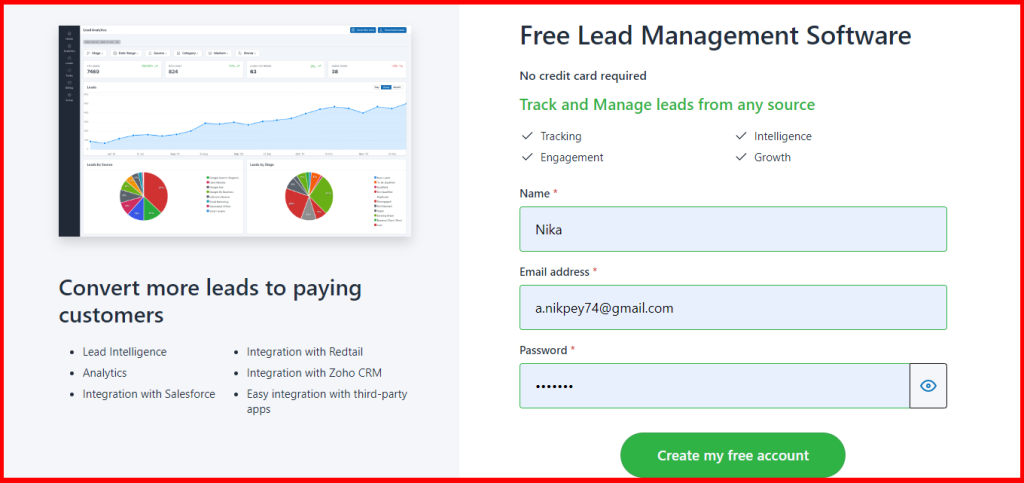
Sign up for free on LeadCenter.ai now!
Integrating LeadCenter.ai with Redtail CRM is a powerful way to enhance your lead tracking process and streamline your workflow. The integration allows you to automatically transfer your SmartAsset leads from LeadCenter.ai into Redtail CRM, creating new contacts or updating existing ones as needed.
When mapping your lead fields from LeadCenter.ai to Redtail CRM, it’s important to note a few key points.
For example, If you map the Company field, LeadCenter.ai will search to see if the company already exists in Redtail. Otherwise, a new business contact will be created for that company. However, you may map your lead fields according to your criteria for lead tracking and analysis.
Integrating LeadCenter.ai with Redtail CRM provides numerous benefits for tracking SmartAsset leads. By automating the lead transfer process, you can save time and reduce the risk of errors. You can also use Redtail CRM’s powerful tracking and reporting features to gain deeper insights into your leads and optimize your follow-up efforts.
Now, let’s see how we can set up the integration between Redtail CRM and LeadCenter.ai in terms of lead tracking.
2. Click on the Complete Registration button after verifying the information.
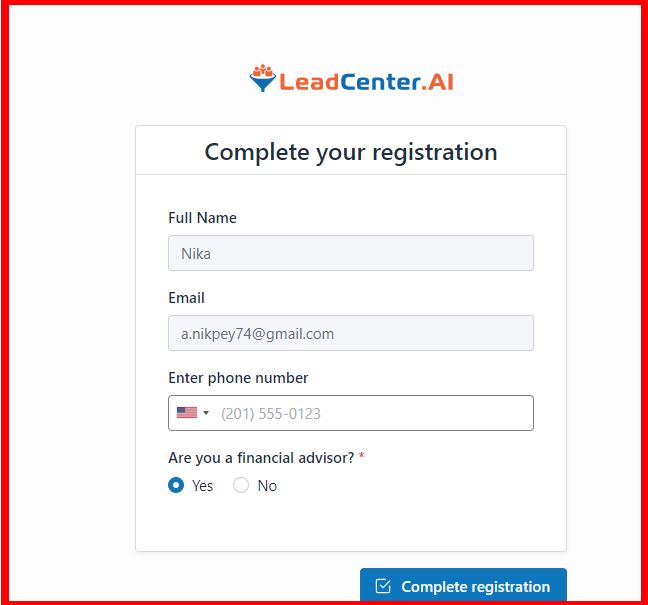
Welcome to LeadCenter.ai!
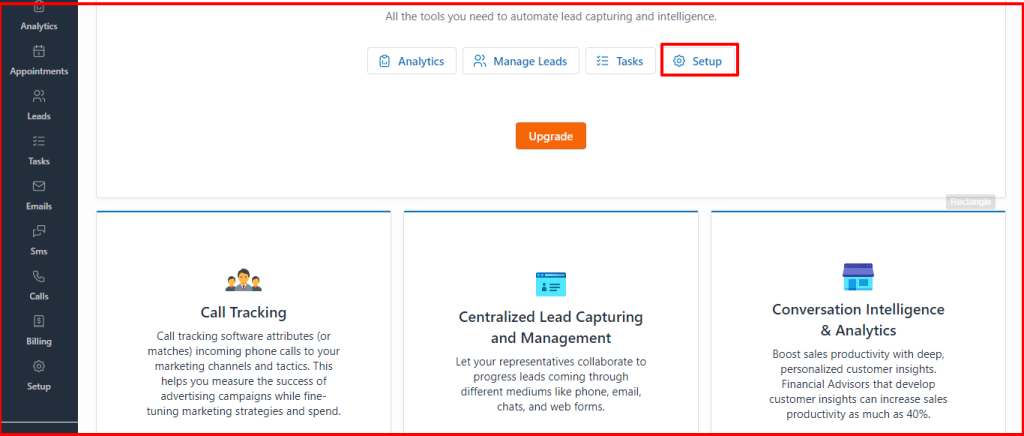
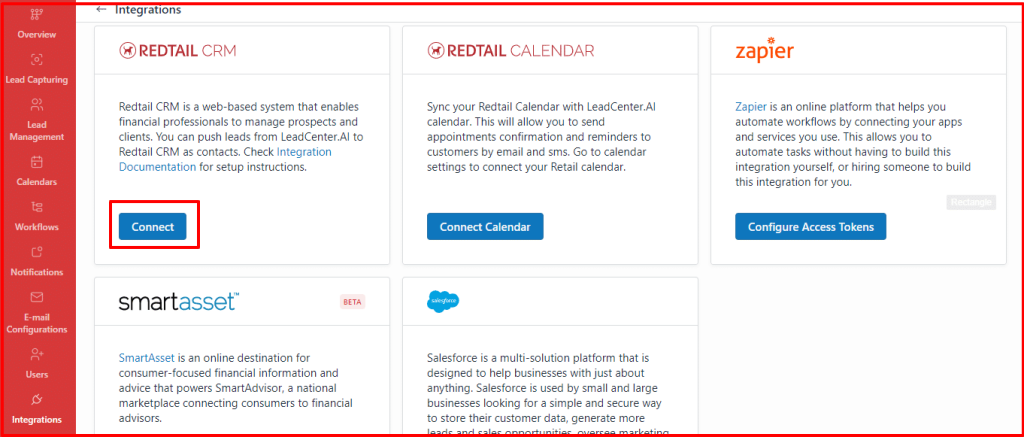
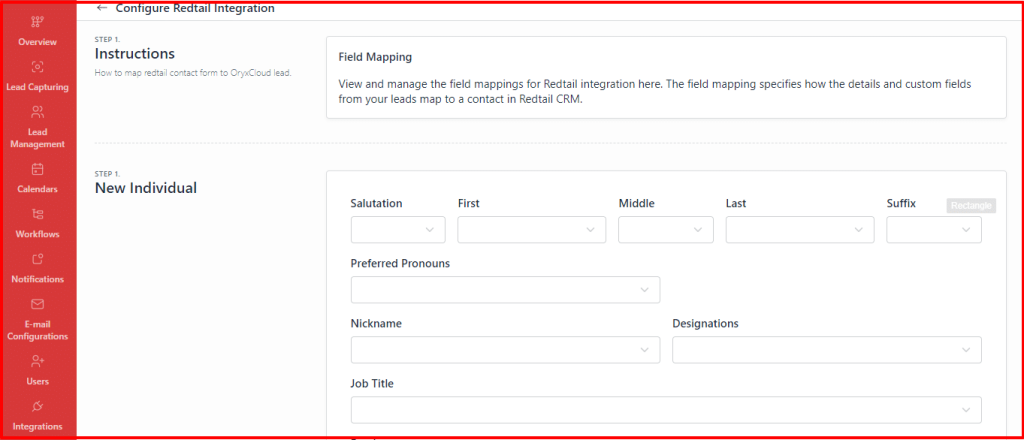
This is how LeadCenter.ai integrates with Redtail CRM.
Tracking SmartAsset leads in Redtail CRM is an essential aspect of managing your leads effectively. Once the integration is set up, the process of tracking these leads becomes automated and more efficient.
The system captures and stores important lead information such as contact details, lead source, and lead status. By tracking SmartAsset leads in Redtail CRM, you can access valuable insights into your lead generation efforts and identify which sources are most successful. This data can help you make informed decisions about your marketing strategies and improve your lead conversion rates over time.
Tracking SmartAsset leads in Redtail CRM can provide numerous benefits for your business, including streamlined lead management, prioritized follow-up efforts, improved conversion rates, and deeper insights into your lead generation efforts. By automating the lead transfer process, you can save time and reduce the risk of errors, while also gaining valuable data to help you optimize your marketing strategies.
Overall, tracking SmartAsset leads as contacts in Redtail CRM through the integration between LeadCenter.ai and Redtail CRM offers financial advisors a unique lead tracking process to have no manual data entry and take an unprecedented step of focusing on qualifying leads. With this integration, financial advisors can streamline their lead management process, prioritize follow-up efforts, and improve conversion rates.
The LeadCenter.ai software helps capture and manage SmartAsset leads with ease, and integrating it with Redtail CRM allows for the automatic transfer of leads, reducing errors and saving time.
Redtail CRM’s powerful tracking and reporting features provide valuable insights into lead generation efforts, helping financial advisors develop better strategies and improve lead conversion rates over time. Overall, tracking SmartAsset leads in Redtail CRM can significantly improve a financial advisors’ ability to manage their leads effectively and grow their business.
Let’s read people also asked questions about lead tracking and Track SmartAsset Leads as Contacts in Redtail:
Lead tracking is the process of monitoring and managing the interactions between potential customers and your business. It allows you to organize and prioritize your leads, track their progress through the sales funnel, and optimize your marketing efforts accordingly. Effective lead tracking is essential for any business looking to grow and convert more customers.
To set up the integration between LeadCenter.ai and Redtail CRM, you can sign up for free on the LeadCenter.ai dashboard and select “Set up” and then click on “Integration.” From there, you can select Redtail CRM and connect your Redtail account by adding your username and password. Once connected, you can configure the field mapping to ensure accurate data transfer.
SmartAsset is a powerful lead generation tool for financial advisors that allows them to capture high-quality leads by providing personalized financial advice to potential clients. SmartAsset offers a range of tools to help advisors generate leads and grow their business, including financial calculators, a personal finance blog, and access to a network of financial advisors.
LeadCenter.ai is a lead tracking and management software that helps financial advisors capture and manage SmartAsset leads with ease.
